Merchant Sign-Up & Login
Card Not Present › Merchant Sign-Up & Login
A merchant can choose from the following two options to sign up with TWPayz:
Sign-up through API
To register with TWPayz, submit the required details to the merchant signup endpoint:
https://sandbox.twpayz.com/merchantServices/api/v1/merchantSignup
Provide the following information in your signup request:
- Username
- Password
- Confirm Password
- Organisation Name
- Site URL
- Country
- Support Number
- Contact Email Address
- Contact Person's Name
- Contact Telephone Number
Once all required details are submitted successfully, your merchant account will be registered with TWPayz and you can proceed with the onboarding process.
Sign-up through API
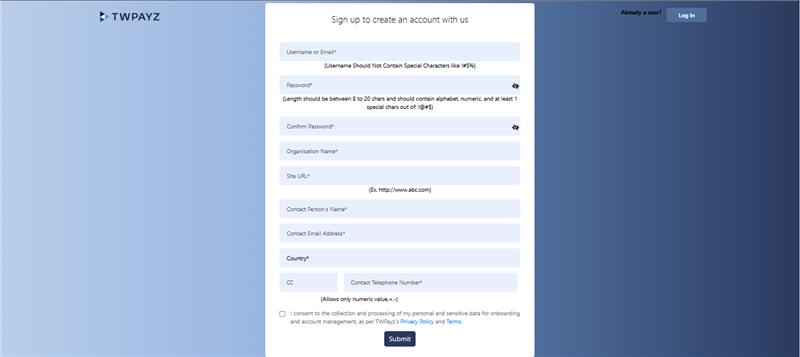
You can also register directly through the TWPayz Merchant Portal by visiting
https://sandbox.twpayz.com/merchant/index.jsp.
On the login page, click the "Create an Account" button to access the merchant registration form.
The signup form requires the following information:
- Username
- Password
- Confirm Password
- Organisation Name
- Site URL
- Country
- Support Number
- Contact Email Address
- Contact Person's Name
- Contact Telephone Number