Virtual Checkout
Take a card payment manually
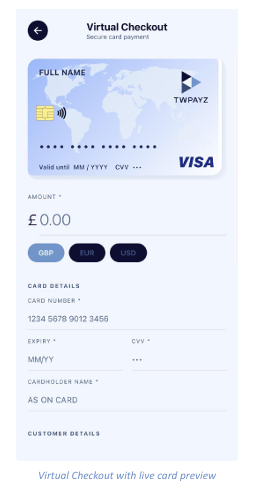
Virtual Checkout lets you key a card in directly — useful for mail order and telephone order (MOTO) sales. A card preview at the top of the screen fills in as you type, so you can sanity-check the details before submitting.
Taking a payment
- Enter the Amount and select the Currency: GBP, EUR or USD.
- Under Card Details, enter the 16-digit Card Number.
- Enter the Expiry date in MM/YY format.
- Enter the CVV — the security code from the back of the card.
- Enter the Cardholder Name exactly as it appears on the card.
- Scroll down to complete the Customer Details section, then submit the payment.
Once generated, share the link by message or email, or let the customer scan the QR code in person. The payment appears in your transaction list as soon as it completes.
Note: Never store card numbers, expiry dates or CVV codes yourself. Key them in at the point of sale and
let TWPayz handle the rest.