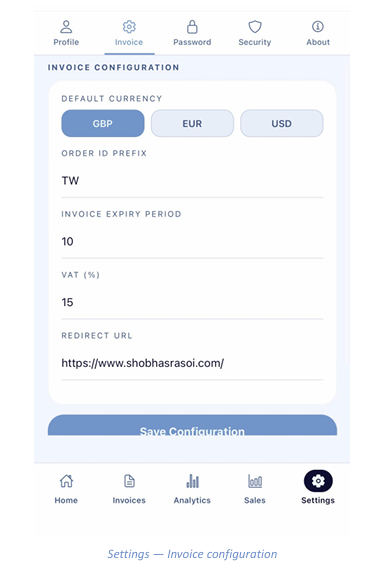
Settings - Invoice Configuration
Defaults applied to every new invoice
Open the Invoice sub-tab in Settings to set the defaults used whenever you raise an invoice or payment link.
- Default Currency — GBP, EUR or USD. This is pre-selected on new invoices and links.
- Order ID Prefix — a short code placed at the start of every order reference, making your transactions easy to identify.
- Invoice Expiry Period — the number of days an invoice stays payable before it is marked Expired in Analytics.
- VAT (%) — the tax rate applied when you tick “VAT applicable” on an invoice line.
- Redirect URL — the web page your customer is sent to after a successful payment, typically your own website.
Tap Save Configuration at the bottom of the screen to apply your changes. Existing invoices are not affected.