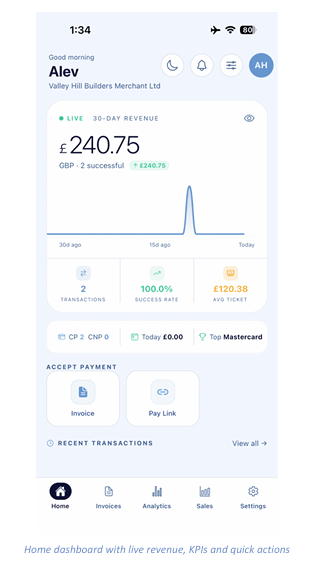
Home Dashboard
Your business at a glance
After signing in you land on the Home tab. It greets you by name and shows your trading name underneath, so you always know which account you are working in.
The revenue card
- 30-day revenue — your total takings over the last 30 days, with a live indicator confirming the figure is up to date.
- Trend chart — a 30-day line chart running from 30 days ago on the left to today on the right, so spikes and quiet periods are easy to spot.
- Eye icon — tap it to hide the revenue figures if you are in a public place.
Key metrics
- Transactions — the number of payments taken in the period.
- Success rate — the percentage of attempted payments that completed.
- Avg ticket — your average transaction value.
Accept payment
Two shortcut tiles let you start taking money immediately: Invoice opens the invoice builder, and Pay Link opens the Pay By Link generator. Beneath them, Recent Transactions lists your latest activity — tap View all to see the full list.
Header icons
- Moon — switch between light and dark appearance.
- Bell — view notifications.
- Sliders — open Customise Dashboard (see section 3).
- Avatar — your account initials.