Analytics
Invoice insights and collection performance
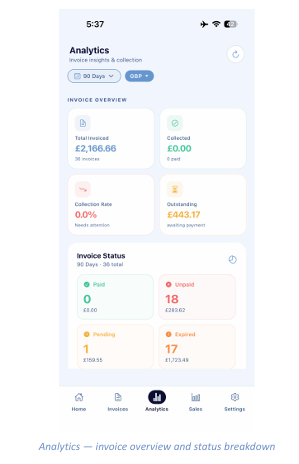
The Analytics tab shows how well your invoices are actually converting into cash. Use the two controls at the top to set the reporting period (for example 90 days) and the currency, then tap the refresh icon in the top right to pull the latest figures.
Invoice Overview
- Total Invoiced — the total value raised, with the number of invoices beneath.
- Collected — how much has actually been paid, and how many invoices are settled.
- Collection Rate — collected as a percentage of invoiced. A low figure is flagged as needing attention.
- Outstanding — the value still awaiting payment.
Invoice Status
The status grid breaks your invoices into four buckets, each showing a count and a total value:
- Total Invoiced — settled in full.
- Collected — issued but not yet paid, and still within their expiry window.
- Collection Rate — awaiting confirmation.
- Outstanding — passed their expiry period without payment. These need chasing or reissuing.
Note: A large Expired figure usually means your invoice expiry period is too short for how your customers
pay. Adjust it under Settings › Invoice.