Pay By Link
Send a payment request in seconds
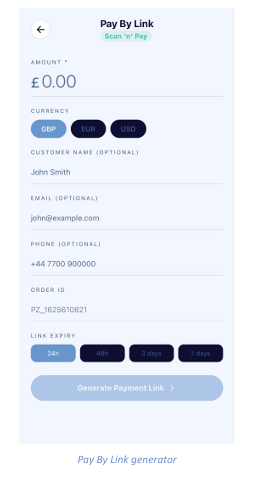
Pay By Link — also labelled Scan ’n’ Pay — creates a shareable link or QR code your customer can pay through, without you needing a card terminal. It is ideal for phone orders, social media sales and remote customers.
Creating a link
- Enter the Amount to charge (required).
- Select the Currency: GBP, EUR or USD.
- Optionally add the Customer Name, Email and Phone so the payment is easy to reconcile later.
- An Order ID is generated automatically using your configured prefix — edit it if you use your own reference system.
- Choose a Link Expiry window: 24h, 48h, 3 days or 7 days.
- Tap Generate Payment Link.
Once generated, share the link by message or email, or let the customer scan the QR code in person. The payment appears in your transaction list as soon as it completes.
Note: Shorter expiry windows are more secure. Use 24h for immediate payments and longer windows
only when the customer needs time to pay.