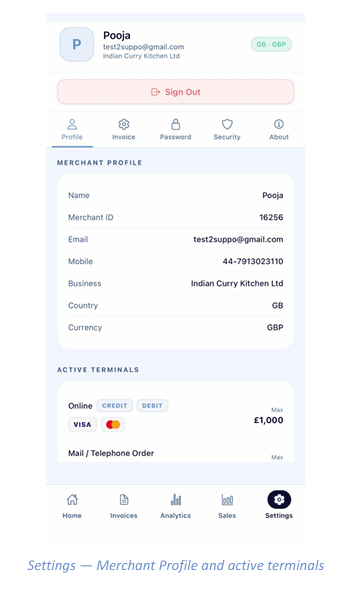
Settings - Profile
Your merchant details and terminals
The Settings tab is divided into five sub-tabs: Profile, Invoice, Password, Security and About. Profile opens by default.
Merchant Profile
This card is your account record — name, Merchant ID, email, mobile number, registered business name, country and settlement currency. Your country and currency are also shown as a badge at the top of the screen. Quote your Merchant ID whenever you contact support.
Active Terminals
Below your profile, each terminal enabled on your account is listed with the card types it accepts and its maximum transaction value:
- Online — accepts credit and debit cards from the supported schemes, up to the stated maximum per transaction.
- Mail / Telephone Order — the MOTO terminal used by Virtual Checkout, with its own limit.
Signing out
Tap Sign Out at the top of the Settings screen to end your session.