Security
Card Present › PAX A920 Pro › Security
Protecting your customers' card data and your terminal from tampering
Point-to-Point Encryption (P2PE)
The PAX A920 Pro operates under a fully P2PE-certified environment. This means card data is encrypted at the moment of card entry and is never stored on the terminal in readable form. Even if the device were physically compromised, no usable card data could be extracted from it.
- Card numbers, PINs, and CVVs are never stored locally on the terminal
- All data is transmitted to TWPayz servers over encrypted HTTPS connections
- TWPayz is PCI DSS compliant — your card-present transactions are covered under our compliance programme
Quarterly Tamper Inspection
PCI DSS requires merchants to inspect their payment terminals at least once every three months for signs of tampering or skimming devices. This takes 2–3 minutes and can be done at the start of any day.
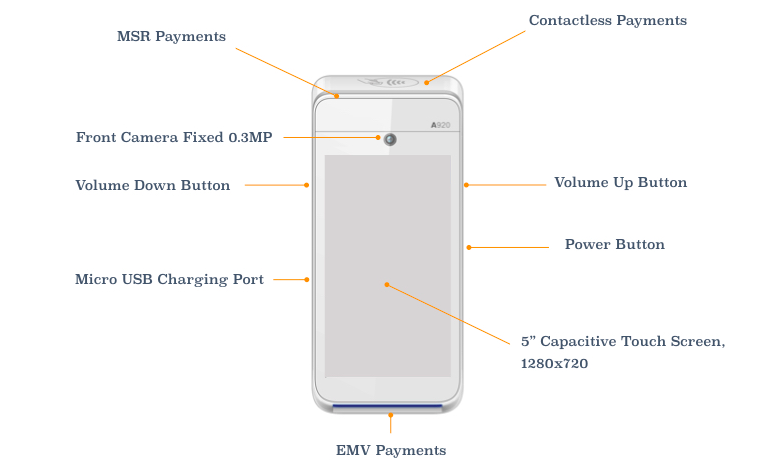
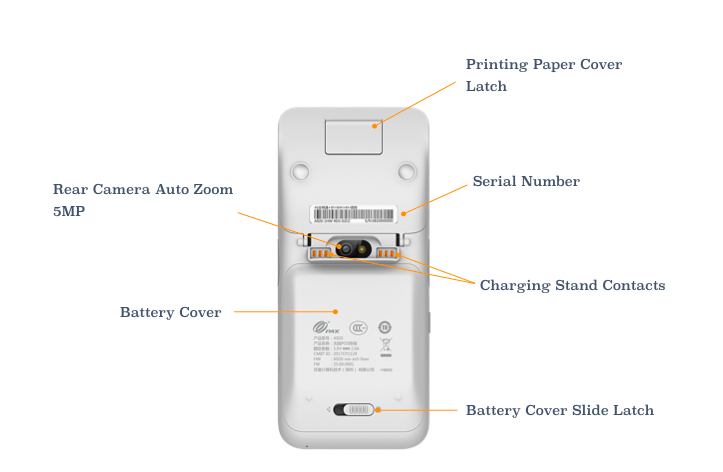
What to inspect
| Zone | What to look for |
|---|---|
| Chip card slot (bottom) | No extra overlay or insert inside or around the slot. Slot edges should be clean and flush. |
| NFC / contactless zone | No adhesive residue, overlay sticker, or unusual raised surface around the NFC area. |
| Magnetic swipe slot (right side) | No secondary card reader or overlay placed over or inside the swipe slot. |
| Screen and keypad | Screen should be flat and fixed. No unusual overlay on the keypad or display area. |
| Casing and seams | No unexplained holes, loose panels, foreign wires, or adhesive on the body of the terminal. |
If you notice anything unusual — stop using the terminal immediately. Do not process any more payments. Contact TWPayz support at once on +44 20 3129 9840. We will arrange a terminal replacement as a priority. Never attempt to remove a suspected device yourself.
Physical Security — Daily Practices
- Keep the terminal in your direct line of sight during every transaction. Do not hand the terminal to the customer and leave them unattended with it.
- Do not allow the terminal to be left unattended in public-facing areas when not in use.
- Power off at the end of each business day.
- Store securely overnight — locked drawer or staff office, not on a public counter.
- Log who uses the terminal. If you have staff, use the TWPayz Merchant App Staff Access feature to assign separate logins rather than sharing a single account.